


Do you want to increase your sales with the help of WhatsApp? Then, you don’t have to look anywhere else. This time, we are sharing some great WhatsApp share plugin that helps your visitors to share your products and posts on WhatsApp just with a click of a button. WhatsApp is a great way to grab new customers for any business because as per a recent survey, WhatsApp is the most popular messaging app and most of the persons are very active on WhatsApp as compared to Facebook messenger. These WhatsApp sharing plugins will add a WhatsApp share button to your custom post types, posts, and pages. You can quickly change the text, color, icon, and position with just a few clicks. Check out these WhatsApp share buttons and choose your favorite WhatsApp WordPress plugin from the below list.
We have collected these amazing Best Whatsapp Share Plugin that are as follows:
- Elfsight WhatsApp Chat Widget
- WhatsApp Chat WordPress Plugin
- WordPress WhatsApp Support Plugin
- WPNotif – WP SMS & WhatsApp Message
- Cresta Whatsapp Chat Plugin
Please note that all these WordPress WhatsApp plugin are fully compatible with the latest version of WordPress. You can easily use these WhatsApp Sharing buttons according to your own requirement.
1).Elfsight WhatsApp Chat Widget
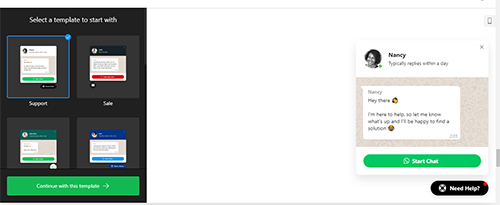 Elfsight WhatsApp chat widget lets you embed the popular messenger on your website. You will get in touch with your audience anytime, anywhere, answering from any device. You can easily change the interface and choose your icon, add a caption, state your reply time, and create a welcome message. You will also get a chat open trigger to open the chat window at exit intent or even after a certain time on the page. It helps you provide useful information about your offers and convince more people to purchase.
2).WhatsApp Chat
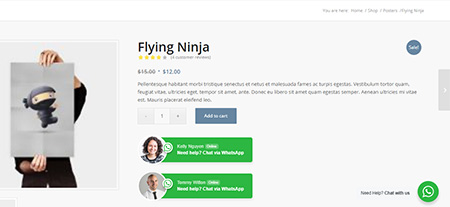 Whatsapp chat WordPress plugin will allow you to connect and interact with your customer and it also allows you to add multiple accounts of your members into a WhatsApp box to display. With easy to use Shortcodes, you can quickly show the WhatsApp box anywhere on your website. It supports WPML plugin that helps you to translate your site language into any other language you want. You can easily customize each box for each person depending on their time availability with photo, name tag and job title, etc.
3).WordPress WhatsApp Support Plugin
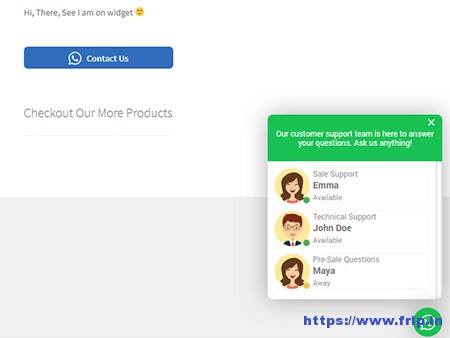 If you want to give support to your users via WhatsApp, then this WordPress plugin will surely help you to do the same. It support both multi & single person and lets you to filter the queries by pages and slugs. You can change the popup location on mobile as well as on desktop and easy to use shortcode generator make it easy to generate live support button that you can place anywhere on your site. Other features of this plugin are group invitation, custom welcome message, an auto popup with sounds, schedule by days, responsive design and fully customizable, etc.
More Info / Download View Demo
4).WPNotif – WP SMS & WhatsApp Message Notifications
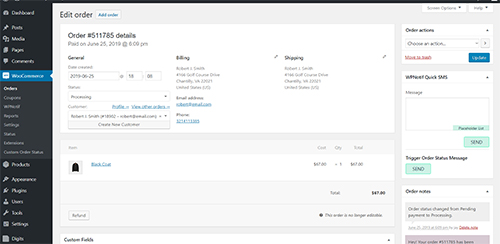 WPNotif WordPress plugin will allow you to send notifications using SMS or WhatsApp to your customers directly from your WordPress website. You can easily setup automatic notification triggers for your customers so whenever they create a new order or whenever the status order is changed, they will get a notification on their WhatsApp. It also allows you to send SMS to any number and even in bulk using the setting panel. Some other features of this WordPress plugin are as follows.
Features:
- Send quick SMS
- WooCommerce custom order status
- Custom placeholders
- GDPR compliant
- 20+ SMS integrated gateways
- Multisite support
- Translation ready
- Multi country support
- Manually trigger order status SMS etc.
You Might Also Like:
5).Cresta Whatsapp Chat
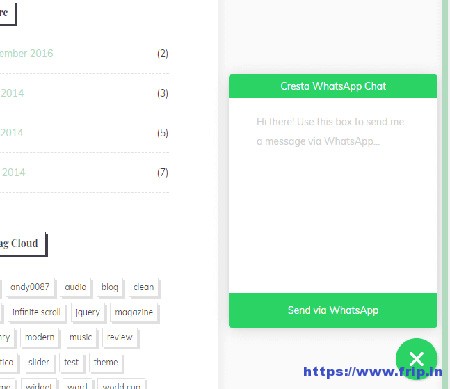
It will allow your visitors to contact you via customers just by simply clicking on a button and the user can contact you directly in a private message on your Whatsapp number, and you can continue the conversation there. You can efficiently use the shortcode to display whatsapp button anywhere on your site etc.
What Next??
I would recommend you to use these WordPress WhatsApp plugin for your website as it comes with many features which I discussed above. I have already cleared all the features of a real WhatsApp share button. So what are you waiting for?? Grab these awesome WhatsApp WordPress plugins for your existing or upcoming website.
Which plugin do you have for social network sharing ?
Hello Krunal,
I am using SocialPug plugin : https://wordpress.org/plugins/social-pug/
Regards
Himanshu