
Affiliate Disclosure: This post contains affiliate links. If you make a purchase through these links, I may earn a commission at no extra cost to you.
Over the past decade, WordPress has grown from a blog-only CMS into an eCommerce CMS that lets users easily create websites of any size. Today, every other big and small business uses WordPress to run their websites. But most people ignore the security of their websites, thinking hackers target big businesses, not small ones. According to SMB data breach statistics, over 700,000 small businesses were attacked in 2020 alone, and in 2025, over 46% of small businesses reported breaches, costing the average victim $120,000 per incident.
 Most of the hacks don’t happen overnight. The hackers try to enter your website through the backdoor, and once your site gets infected, it will also damage your site’s reputation, like damaging your SEO, stealing your site data, and even redirecting your traffic to malicious sites or odd sites.
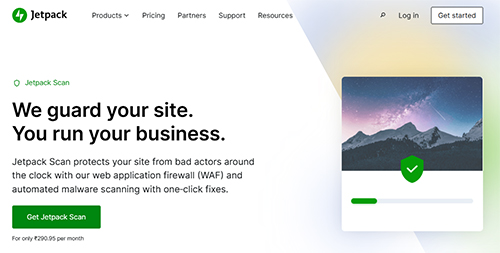
In these scenarios, Jetpack Security Scan is essential for small, medium, and large-scale businesses.
Jetpack Security comes with combine security forces of
- Jetpack Security Scan
- Web Application Firewall (WAF)
Both of these features will automatically create a defense layer on your WordPress website, allowing your site to fend off malicious attackers on its own.
Jetpack Scan is designed to continuously scan your WordPress-powered website for malware, vulnerabilities, and even small suspicious changes. So, you can easily catch the small problem before it become disaster for your business. Let’s break down how Jetpack works and how it protects your website.
What is Jetpack Scan?
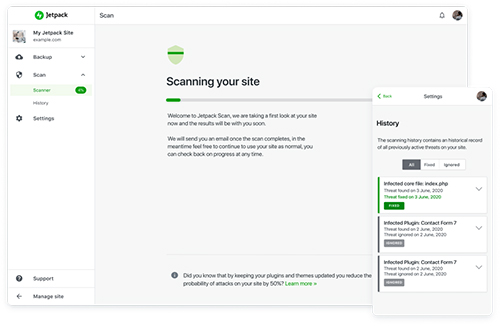 Jetpack Scan is an automated malware and vulnerability monitoring system built specially for WordPress. This will automatically scan your WordPress site for suspicious behavior, rather than manually scanning every file on your website.
It’s a scan of the website to catch the following
- Malware infection
- Spam or SEO injections
- Any altered WordPress core files
- Vulnerable plugins or themes
- Suspicious files changes
- Inject malicious scripts.
When it catches anything related to the above, it will automatically alert you about it via email. You will get a clear notification about the incident, and it will also guide you on how to resolve the issue.
How Web Application Firewall (WAF) Protect Your Site?
A security scan only detects problems; but a web application firewall prevents them from occurring in the first place.
Jetpack’s web application firewall (WAF) acts as a protective shield between your site and incoming unknown traffic, and it automatically analyzes the request before it reaches your server. If incoming traffic matches known bad actors, it is automatically blocked.
The Web Application Firewall (WAF) protects your website against the following
- Brute force login attacks (a common way to get into a WordPress site)
- Malicious bot traffic
- Injection attempts
- Suspicious request behavior
- Automated vulnerability scanning
All of this is proactive defense: instead of waiting for the malware to appear on your website, clean it up later. The firewall automatically reduces the chances of infection in the first place.
The combined layered security of both Jetpack Scan & Web Application Firewall (WAF) will protect your website from all types of attacks.
Why Is Layered Security a Must in 2026?
In 2026, hackers don’t select websites to attack; they use advanced software to attack them automatically. They run bots that scan thousands of WordPress websites for any available vulnerability.
Mostly, small-scale businesses are targeted because they believe that creating a strong password is enough to protect their website. But now, a single layer of security isn’t enough; you need to add multiple layers to a WordPress-powered website.
The layered security is a must because
- The prevention reduces the risk
- It fast alerted reduce the downtime
- The detection reduces the damage as well
Features of Jetpack Scan
- Automated daily scanning
- One-click fixes for most issues
- Website firewall (WAF)
- Instant email notifications when threats are detected
- Priority support
What Happen When A Threat is Detected?
Whenever a threat is detected on your website during a scan, Jetpack not only warns you but also helps you resolve the issue.
When any issues appear, you will receive
- A clear explanation of the problem
- Affected files or plugins
- Recommended next steps
- Cleanup direction
So, instead of going through the security forum out there for help, the Jetpack will give you actionable insight.
SEO Protection: An Overlooked Benefit
 Most people think website security is just about securing files and data, but that’s not true. An infected website also directly affects the SEO.
Search engines don’t like the infected site, and they penalize it aggressively.
If Google detects malware or spam on your website, it will encounter the following issues.
- Site ranking drops
- Browser security alerts
- Removal from the search indexes
- Warning labels in the search results
- Suspension of ads
And we know how long a site takes to recover from any Google penalty. So, Jetpack Scan helps you detect threats early, before they trigger the search engines. For every blogger, business, and even online store, protection is a must.
Best Practices To Protect Your Website
- Use strong passwords
- Enable two-factor authentication
- Keep updated WordPress
- Update the plugin regularly
- Don’t install pirated software
- Maintain regular backups
- Remove unused themes/plugins, etc.
Who Should Use Jetpack Scan & WAF?
You might be thinking Jetpack scan is designed only for big businesses, but you are wrong. The Jetpack scan is a must for
- Bloggers & content creators
- WooCommerce stores
- Business websites
- Agencies managing client sites
- Membership & booking platforms, etc.
Jetpack Scan Pricing:
- $3.16 per month, billed yearly (after discount)
Conclusion:
In the end, I would like to say that Jetpack Scan & WAF, combined, will continuously protect your WordPress website with no complexity. Everything is automated, so you don’t have to worry at all.