
Affiliate Disclosure: This post contains affiliate links. If you make a purchase through these links, I may earn a commission at no extra cost to you.
Whether you are running a blog, a company website, or even an eCommerce store, you always need to back it up for unforeseen circumstances. A crashed or non-working website always leaves a dent on your brand, and even clients avoid buying products from your website because they can’t track their orders. Most bloggers or store owners usually back up their websites once a week or daily, depending on their hosting provider. But it always affects them when something odd happens.
 Most of the common scenarios where the site owner suffers a crash issue:
- A theme update can crash your layout
- A plugin conflict can even break your layout
- Even a small update can distort your website.
According to experts, one should always back up their website before upgrading anything on it. But as human beings, we always choose to ignore these warnings, and in the end, we suffer greatly.
To resolve these issues, we recommend using the Jetpack Real-Time Backup solution.
Jetpack Real-Time Backup saves every change you make to your website, and you can restore your site with one click from VaultPress backups.
Why is Jetpack Real-Time Backup a Must?
 When you buy web hosting for your website, the provider usually offers you the option to back up your site once a day. But when you use Jetpack’s Real-time backup option, your website is automatically backed up whenever you make changes.
Means Jetpack will backup your site when
- You publish a new post
- You upload new images
- You receive an order for your eStore
- You make changes in the settings
- You install or update the plugin
- You edit or delete your post
- You modify your theme files and related assets.
Any little change you make to your website, Jetpack Real-time Backup will automatically back it up on their server for you. So, this will help you restore your website to its previous state if it breaks while you’re making changes.
Try Jetpack VaulPress Backup Now
Jetpack Activity Log Feature:
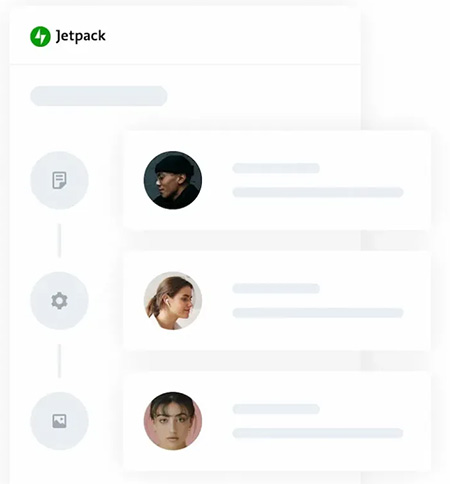 Jetpack also provides you with an Activity log feature, which allows you to see the changes made on your website, including the time and person who made it. You can easily check the following changes in the Activity log:
- Login attempted by the registered site owners
- Post & pages publish, update, or delete
- Plugin installation, update, and removal
- Theme install, update, and delete
- Site setting modification
- Brute force attack protection
- Site performance score, etc.
What does Jetpack Real-Time Backup protect?
Most of you think that Jetpack normally backs up only website files, but that’s not true. Jetpack backs up the following stuff.
- Website files -> themes, plugin & upload
- Order & customer information of eStores
- Database -> posts, pages, users & settings
- Content updates -> new pages and layout changes.
Features of Jetpack VaultPress Backup
- It backup your site on a cloud server, so there is no load on your server
- All backups are encrypted, which keeps your data secure
- Surplus copies made globally on multiple servers
- Global server infrastructure
- Custom WooCommerce table backups
- Complete list of all site changes
- Quickly resort from any point
- Unlimited restores
- Unlimited site migrations
- WooCommerce support included, etc.
Easily Migrate your WordPress Site
If you are looking to migrate your website, then you don’t need to install any other plugin. Jetpack VaultPress backup also works as a WordPress Migration plugin, which helps you to transfer all your stuff, i.e., database, plugins, settings, themes, and your content & images, with just one click. You can quickly migrate your website to any host. Most importantly, this migration option is available across all Jetpack plans.
Remember these things to get the benefit of Real-Time Backup
- Always update your themes and plugins
- Don’t install unknown plugins; always use the WordPress.org site
- Keep your database light
- Uninstall unused themes
Who Should Use Jetpack Real Time Backup?
You must be thinking that the web hosting backup will be enough for you. but, that’s not true. Jetpack Real Time Backup is a must for
- WooCommerce site owners
- Appointment & booking sites
- Active bloggers
- Content creators
- Multiple author sites
- Small & medium companies as well.
How to Set Up Real-Time Backup?
After sharing the benefits of Jetpack Real-Time backup, it’s time to set it up. Just follow these steps, and you are ready to take a real-time backup of your site.
1) Install Jetpack
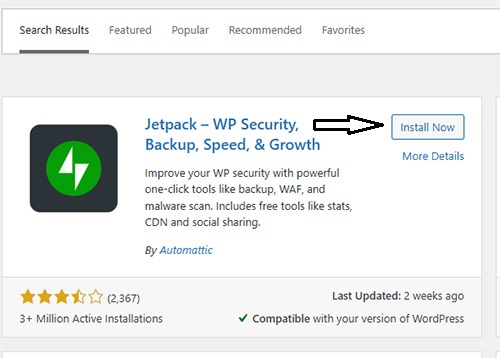
Go to your WordPress Dashboard -> Plugins -> Add New & search Jetpack & Click on Install
2) Supercharge My Site

After installing the Jetpack, the above screen will appear on your website. Just click on Supercharge my site.
3) Connect Account
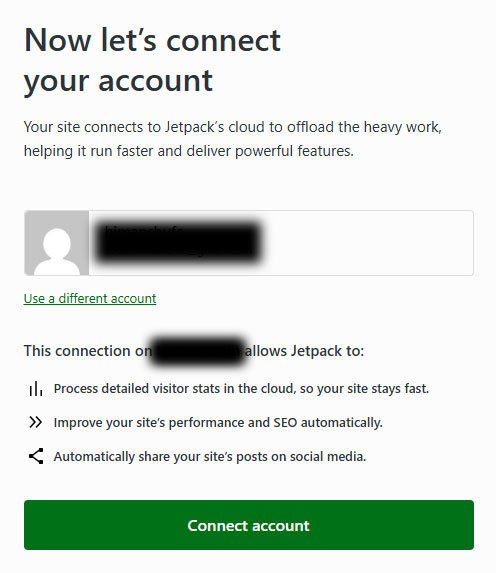
Now, you have to create an account on WordPress.com to connect your website with Jetpack’s cloud platform.
4) Product Section
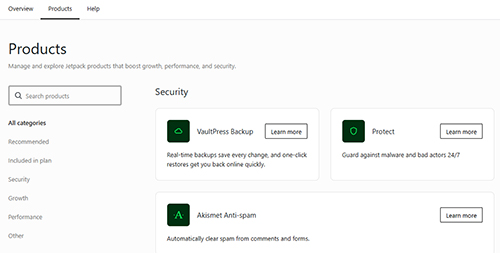
After connecting your site, go to My Jetpack in the left sidebar, click Products, and there you will see VaulPress Backup. Click on Learn More.
5) Buy Your Plan
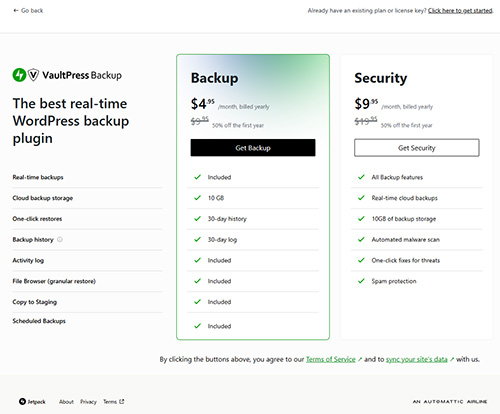
After clicking Learn More, you will see the above screen, where you can buy JetPack real-time backup for your site.
After completing the payment, the plan will be automatically activated on your website, and real-time backup will begin.
Jetpack VaultPress Backup Pricing:
- $4.95 Per Month, billed yearly
Conclusion:
In the end, I want to say that Jetpack Real-time backup is one of the smartest solutions available in 2026, as it lets you back up your site in real-time. It even helps you restore the site when something breaks. It never lets you lose your peace of mind in any unforeseen circumstance. Don’t wait anymore, get your Jetpack Real-time Backup on your website now.
My Personal Experience Using Jetpack for the Previous Years.
I have been using the Jetpack plugin on my blog for the past 7 years, and I can honestly say it is one of the most reliable tools in my toolkit. In the last 4 years, while working on the site, I had issues 2 or 3 times. One day, I accidentally deleted important data, including the core site content and layout settings, and after a month, while playing with the plugin, the site crashed.
In each case, instead of panicking, I simply opened my VaultPress backup dashboard, selected the restore point from a few minutes before my mistake, and my entire site got back to normal within a short time. These real-world moments encourage me to renew my Jetpack year after year without hesitation.
Grab Jetpack VaulPress Backup Now