
Affiliate Disclosure: This post contains affiliate links. If you make a purchase through these links, I may earn a commission at no extra cost to you.
Whether you are running a personal blog, business website, or even a small online store, you must have heard about WordPress.com. Well, it is one of the most popular platforms for building websites, and it is one of the most reliable, clean, and easy to use, even if you are not a developer.
But for years, it’s been a major problem. It was limited to only some features.
You could not install any plugins on your WordPress.com powered website, and you could not control how your website fully works. So, you had to adjust as per the WordPress.com scenario instead of working with it. If you want some flexibility, you usually have two choices: either pay for the expensive plan or switch to an entirely different setup to run your website.
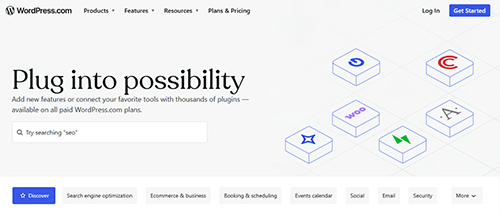 But the best thing is that these things have now changed.
WordPress.com now provides full plugin access and customization with every paid plan, with no hidden upgrades or premium add-ons. When you upgrade your plan, you will automatically get access to the plugin section.
Start Using Plugins to Take Your Site to the Next Level
Well, this is not a SMALL UPDATE. This removes the barrier to plugin functionality, which has frustrated WordPress.com users for years. If you are using this platform, let me break down how to use this new functionality and what it means for you.
Let’s break it down for you.
What Actually Changed on WordPress.com
Before this update, WordPress.com had a clear ceiling.
Through WordPress.com, you could build a good-looking site and even write and publish content. It also allows you to choose a theme from their collection. But when you move beyond the basics and look to customize your site with features like a booking form, an SEO tool, and a performance optimizer, you hit a wall.
Plugins were unavailable or locked behind the expensive plan tiers. This was the reason users moved away from WordPress.com and started self-hosting with WordPress.org, which gives full control and lets you manage your own hosting, security, and updates.
Now, WordPress.com has made access to all paid plans available.
That means, now you can
- Install plugins directly from the WordPress directory
- Customize your site functionality without touching any code
- Build advanced features that were not impossible in this possible
- Control how your site looks.
This is not just a normal update. It allows you to extend your site functionality and help you to do what you need it to do.
What this Meant for Different types of Users
Well, this update does not affect everyone the same way. It depends on how you use the WordPress.com site, and the impact will be different. Let’s check out the common scenarios.
If you want to sell products
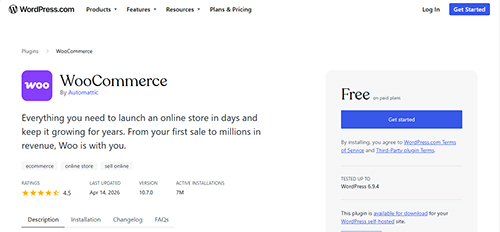 WooCommerce is now available on WordPress.com
This is the biggest change for lots of those people who want to start their eStore but don’t have the technical knowledge to setup it.
WooCommerce.com is a widely used eCommerce plugin worldwide. It converts your normal-looking blog into a fully functional online store. And, now you can install it directly on your WordPress.com powered website without switching to the self-hosted WordPress.
With WooCommerce, you can:
- Manage your inventory
- Offer coupons and discounts
- Track and manage orders from your dashboard
- Extend your store with hundreds of WooCommerce-specific plugins
- Set up multiple payment methods, including credit card, PayPal, and much more.
Apart from WooCommerce itself, you can install other plugins to enhance your website, such as checkout experience, reducing cart abandonment, adding upsells, and automating order management.
Start Selling Online with WooCommerce Now
If you are a blogger
 Running a blog on WordPress.com was always decent, as it allows you to write, publish, and share your content without any issues. But growing your blog is as difficult as ranking your blog on search engines and attracting regular readers, and you can’t do it without using the right tools.
But now you can install SEO plugins like Yoast SEO or Rank Math, whichever you prefer. And these tools, which allow you to:
- Add meta titles and descriptions to every post
- Improve your internal linking structure
- Fix technical SEO issues on your site
- Track which keywords your content is ranking fo
- Structure your content properly for search engines
Well, I can say that this is a game-changer for bloggers who want to compete in the search engines without switching platforms.
You can even install performance plugins to improve your page speed, caching plugins to load your site faster, and social sharing tools to make it easy for your readers to share your content.
If you run a business website
 A Business website always has one job: to bring in leads and convert visitors into customers or clients. A basic website can’t do it alone; it requires the right tool.
Before the update, the business owners on WordPress.com had to make compromises. You could not always add the exact form you needed, and even the analytics were limited. You can’t even integrate with your CRM or email marketing tool, which was not always possible.
Now that also changes, too.
You can install:
- Contact form plugins like WPForms or Gravity Forms are designed to convert leads into clients.
- Speed optimization plugins help you to reduce your loading time and improve user experience.
- The analytics plugin also gives you detailed data about your visitors, like who is visiting your site and what they are doing
- Various trust-building plugins like review widgets, testimonial sections, and security badges.
- Chat plugins that allow you to talk to visitors in real time.
After using these plugins, your business website will actively bring in revenue, and it’s not just a page that sits online and looks professional.
The Design Improvement You Should Not Ignore
You don’t have to ignore the design improvement part, as WordPress.com now gives you much deeper design control through:
- Block editor customization that gives more control over individual page layouts
- Global styles let you change fonts, colors, and spacing across your entire site from a single place.
- Custom CSS support so you can make precise design adjustments without a theme change
- More theme options so that you can customize your site to match your brand.
Now, you don’t have to hire a web designer to make small changes to your website. Even a color change, cleaner font will give your site a premium look.
Common Mistakes to Avoid
I have already shared all the pros of having a plugin on your website. But there are some common mistakes which I would like to share as well.
- Don’t install too many plugins on your site, as they can slow it down.
- Copying other popular bloggers’ plugins without knowing your own requirements
- Keep your plugins updated
- Don’t install plugins from unknown sources
- Ignoring site speed.
Final Thoughts
WordPress.com has made long demanded and genuine change here. Most people will read about it and go back to their day without doing anything.
Don’t be that person.
With this new feature, select the issue on your site and search for the required plugin. Install that plugin, resolve the issue, and improve your site. If you have feedback about this new update, please let me know in the comments.
Start Using Plugins to Take Your Site to the Next Level